
Every dev tool on your Mac, in one window.
DevShop reads your development environment straight off the filesystem: exact versions, real disk footprint, and offline findings that say what needs attention. It never spawns a subprocess and never touches the network.
macOS 15 or later · Apple silicon or Intel
Or install from the terminal
brew trust lucianoarguello335/tap
brew install --cask lucianoarguello335/tap/devshop
Homebrew 6 asks you to trust a third-party tap once before it will install from it.
Three columns
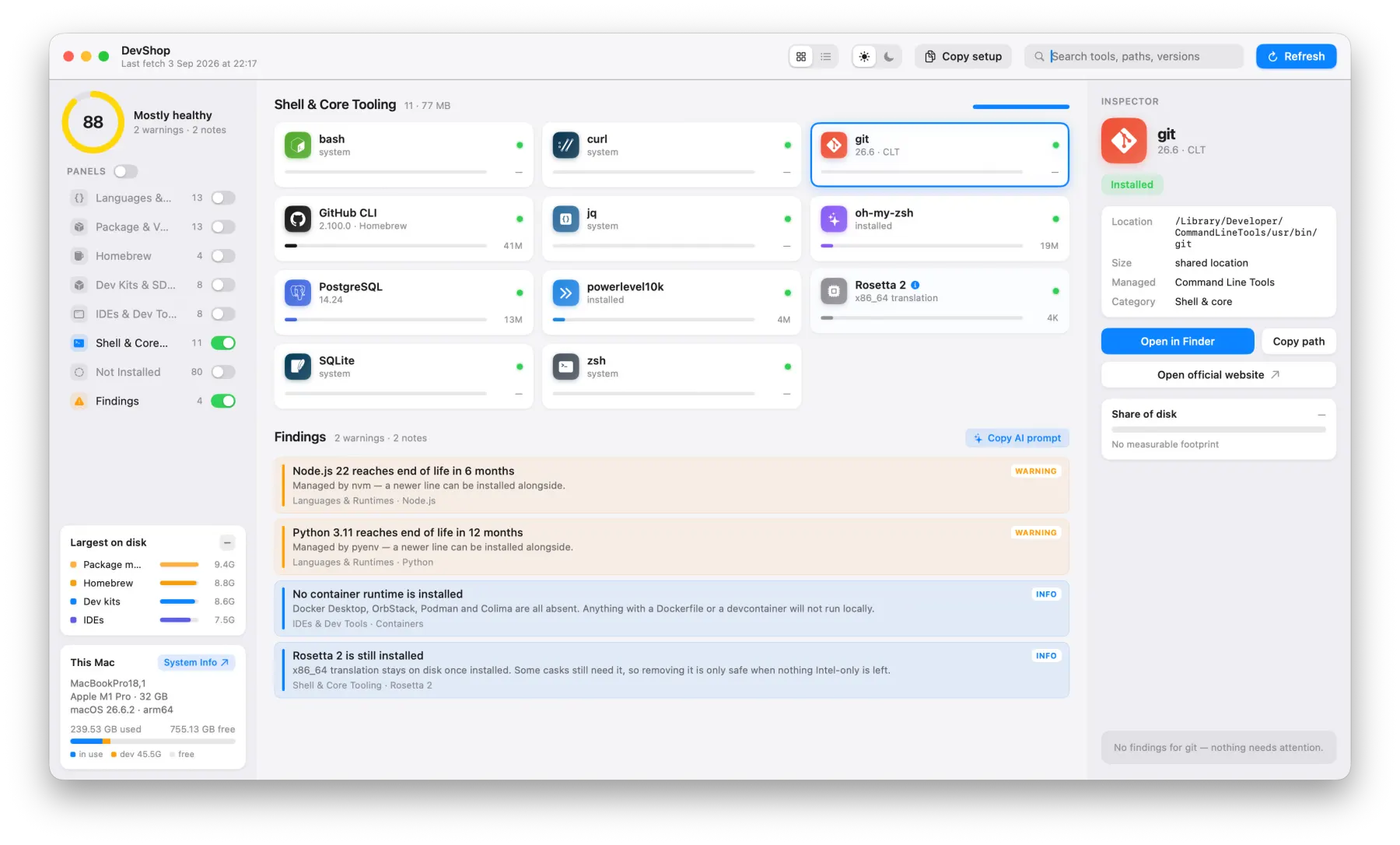
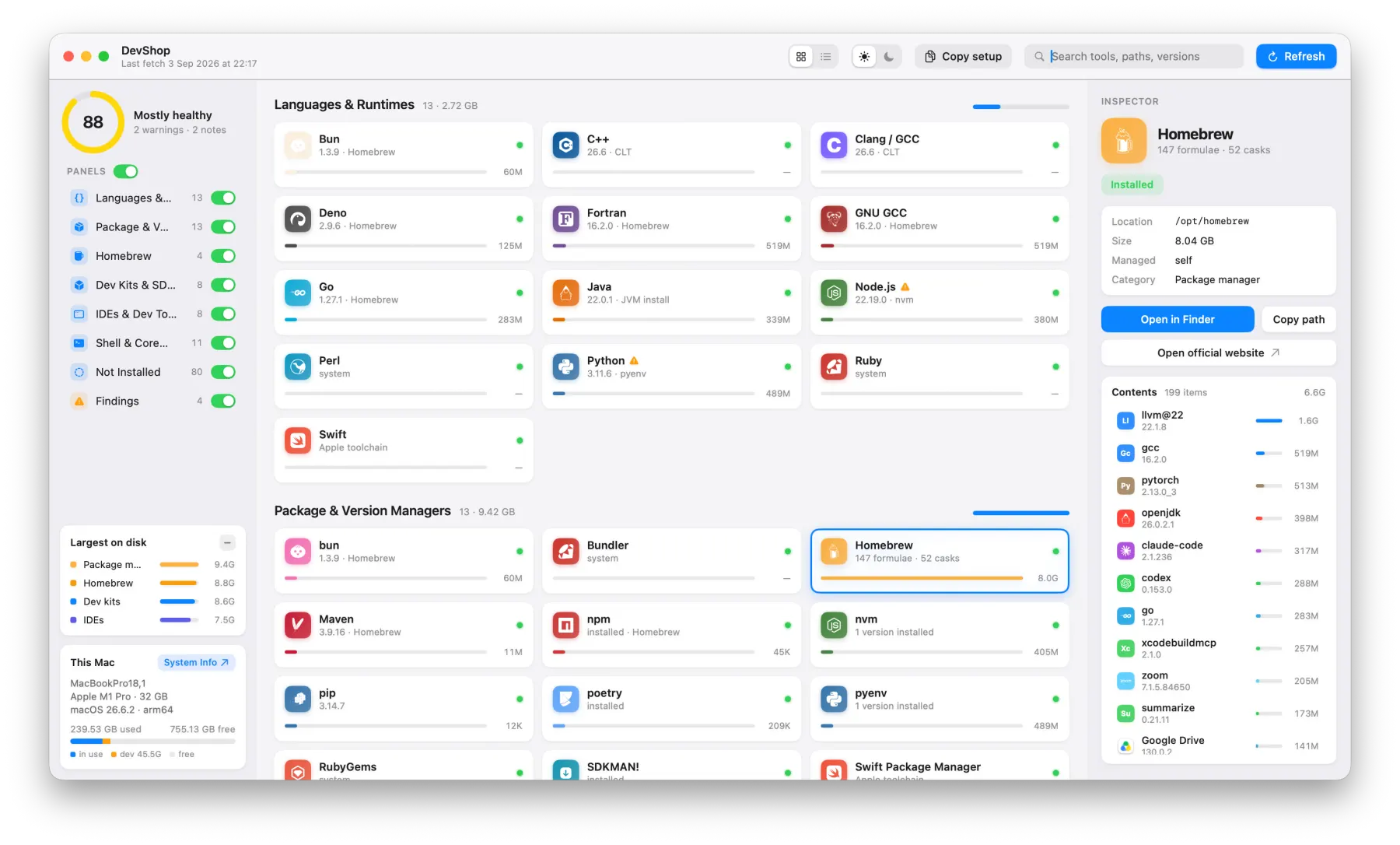
Health on the left, your toolchain in the middle, the selected tool on the right.
- 1
Sidebar — health
Score out of 100, category toggles, the four biggest things on disk, and a This Mac card.
- 2
Centre — the toolchain
Seven categories of detected tools, as a card grid or a sortable list, Findings above them.
- 3
Inspector — the detail
Version, path, size, share of disk, what manages it, what is inside it, its findings.
Five things it does that nothing else does
It sees the whole toolchain at once
137 catalog entries, so anything you do not have lands in a Not Installed panel. You learn what is missing, not only what is there.
It never runs anything
Detection is filesystem-only. Homebrew directory names are the version numbers, so exact versions come from a listing instead of a hundred version calls.
/opt/homebrew/Cellar/go/1.27.1
It tells you what is wrong
Offline rules flag end-of-life runtimes, two installs shadowing each other on PATH, duplicate managed versions eating disk, and a missing container runtime.
It hands the problems to an AI agent
Copy AI prompt puts a full written briefing of every finding on your clipboard. Paste it into Claude and get remediation steps for your actual machine — not a generic answer.
This Mac runs macOS 26.6.2 on Apple M1 Pro. 4 findings:
2 warnings (Node.js 22 EOL in 6 months, managed by nvm; Python 3.11 EOL in 12 months, managed by pyenv), 2 notes…
It exports the machine as JSON
Copy setup writes a sorted, indented, schema-versioned document of every tool, category, finding and installed app. Two machines diff cleanly.
Findings
Every rule runs offline against what was detected. Each finding carries a severity, with its own shape as well as its own colour, and they sum into one number.
A runtime that is already past end of life, or two installs of the same tool shadowing each other on your PATH — the one you type is not the one you think.
End of life inside a year, or duplicate managed versions of one runtime quietly holding several gigabytes you could reclaim.
A gap rather than a fault: no container runtime installed, or a tool present but not managed by anything, so nothing will ever update it.
Grid when you are browsing, list when you are auditing
Choose between a grid style for quick pans and a list style for more detail.


Your dev setup, in a single JSON file
The Copy setup button produces a sorted, indented, schema-versioned JSON document of every tool, category, finding, and installed application.
"schemaVersion": 1,
"machine": {
  "model": "MacBookPro18,1",
  "chip": "Apple M1 Pro",
  "memoryGB": 32
},
"health": { "score": 88, "errors": 0, "warnings": 2, "notes": 2 },
"tools": [
  {
    "name": "Node.js",
    "version": "22.19.0",
    "managedBy": "nvm",
    "bytes": 398458880
  }
]
Just reads, never writes or executes anything on your computer
DevShop just reads what is on your Mac, so there is no risk of a setup breaking change.
Zero shell invocations. Versions come from directory names, not from running binaries.
Zero requests at runtime. The end-of-life rules are compiled in and evaluated offline.
Nothing is installed, updated or removed. Swift 6 with strict concurrency.
Interface symbols: SF Symbols, in-app only
Page icons: lucide, via astro-icon
Get in touch →